MD-102 Exam: Latest Free Practice Questions & Tips
As an important part of the Microsoft 365 certification, the MD-102 exam validates your ability to manage devices and applications in modern IT environments. Whether you’re an IT administrator or looking to enhance your career competitiveness, passing the MD-102 exam is a crucial step forward. In this article, we’ll cover the exam content, share effective study strategies, and provide 15 free practice questions to support your learning journey!
What is the MD-102 Exam?
The Microsoft MD-102 (Endpoint Administrator) exam is a core component of the Microsoft 365 certification track, focusing on endpoint management in hybrid and cloud environments. Key exam objectives include:
- Device Management: Enrolling and managing devices using Microsoft Intune and Azure AD.
- Security and Compliance: Configuring conditional access, compliance policies, and security baselines.
- Application Management: Deploying Win32 apps, Microsoft Store apps, and more.
- Windows Deployment: Leveraging Windows Autopilot for modern device provisioning.
Earning the MD-102 certification showcases your expertise in managing today’s complex IT landscapes, boosting your value to employers.
Why Practice Questions Are Key to MD-102 Success
Practice questions are essential for mastering the MD-102 exam. They help you:
- Get Familiar with the Format: Understand multiple-choice and scenario-based questions.
- Reinforce Knowledge: Cover critical exam objectives.
- Spot Weak Areas: Identify topics needing more focus.
- Gain Confidence: Simulate the exam to reduce test-day anxiety.
We’ve compiled a comprehensive MD-102 exam prep resource with 351 up-to-date practice questions:https://www.leads4pass.com/md-102.html (PDF/VCE), covering all exam topics and real exam formats(View the list below). To help you get started quickly, we’re offering 15 high-quality practice questions for free below.
| Total Questions | 351 Q&As |
| Single & multiple choice | 195 Q&As |
| Drag drop | 26 Q&As |
| Hotspot | 130 Q&As |
| Testlet | 2 Q&As |
Latest Free MD-102 Practice Questions
| Number of exam questions | Last Shared | Related | Download |
| 15 | New Microsoft 365 exam solutions and certification changes | Microsoft 365 | MD-102 PDF |
Question 1:
Your company has devices enrolled in Microsoft Intune as shown in the following table.
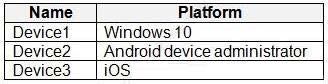
In Microsoft Intune admin center, you define the company\’s network as a location named Location1. Which devices can use network location-based compliance policies?
A. Device1 only
B. Device2 only
C. Device1 and Device2 only
D. Device2 and Device3 only
E. Device1, Device2, and Device3
Correct Answer: E
Intune supported operating systems
Intune supports devices running the following operating systems (OS):
1.
iOS
2.
Android
3.
Windows
4.
macOS
Note: View the device compliance settings for the different device platforms:
1.
Android device administrator
2.
Android Enterprise
3.
iOS
4.
macOS
5.
Windows Holographic for Business
6.
Windows 8.1 and later
7.
Windows 10/11
Reference: https://docs.microsoft.com/en-us/mem/intune/fundamentals/supported-devices-browsers https://docs.microsoft.com/en-us/mem/intune/protect/device-compliance-get-started
Question 2:
HOTSPOT
You have a Microsoft 365 E5 subscription that uses Microsoft Intune.
You have the Windows 11 devices shown in the following table.

You deploy the device compliance policy shown in the exhibit. (Click the Exhibit tab.)
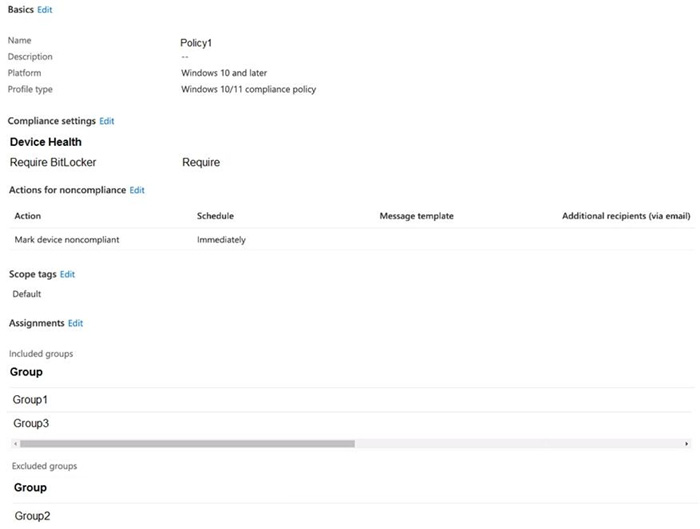
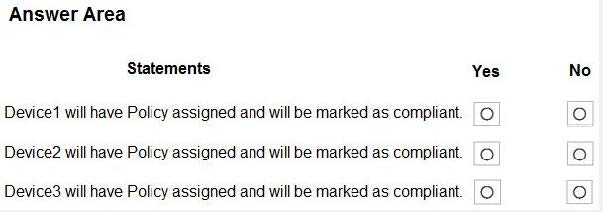
For each of the following statements, select Yes if the statement is true. Otherwise, select No. NOTE: Each correct selection is worth one point.
Hot Area:
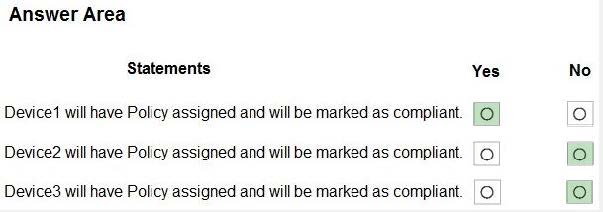
Correct Answer:
Question 3:
HOTSPOT
You have a Microsoft 365 subscription.
Users have iOS devices that are not enrolled in Microsoft Intune.
You create an app protection policy for the Microsoft Outlook app as shown in the exhibit. (Click the Exhibit tab.)
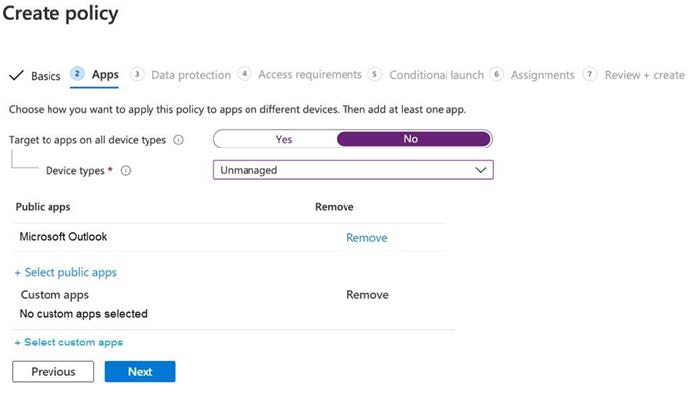
You need to configure the policy to meet the following requirements:
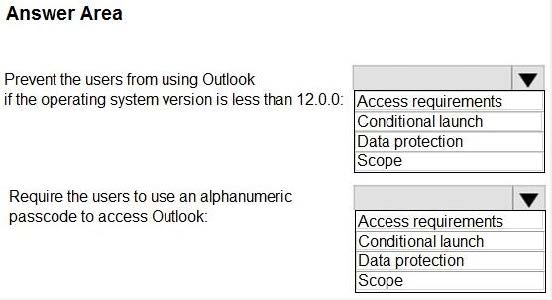
Prevent the users from using the Outlook app if the operating system version is less than 12.0.0.
Require the users to use an alphanumeric passcode to access the Outlook app.
What should you configure in an app protection policy for each requirement? To answer, select the appropriate options in the answer area. NOTE: Each correct selection is worth one point.
Hot Area:
Correct Answer:
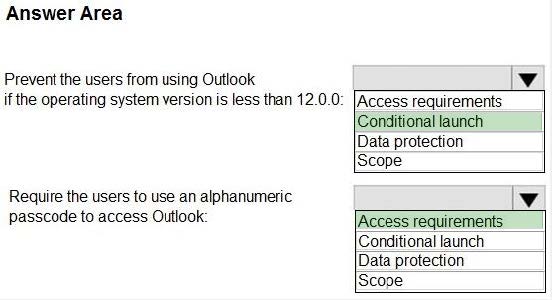
Box 1: Conditional launch
Configure conditional launch settings to set sign-in security requirements for your access protection policy.
By default, several settings are provided with pre-configured values and actions. You can delete some of these, like the Min OS version. You can also select additional settings from the Select one dropdown.
Note: There are three categories of policy settings: Data relocation, Access requirements, and Conditional launch.
Box 2. Access requirements
Access requirements include:
PIN for access: Select Require to require a PIN to use this app. The user is prompted to set up this PIN the first time they run the app in a work or school context. The PIN is applied when working either online or offline.
You can configure the PIN strength using the settings available under the PIN for access section.
Reference:
https://docs.microsoft.com/en-us/intune/app-protection-policy-settings-ios
Question 4:
HOTSPOT
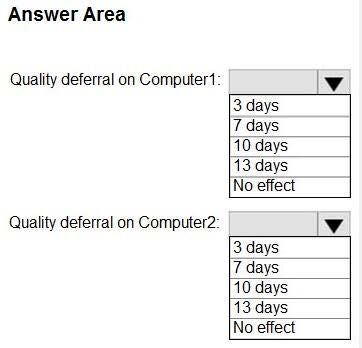
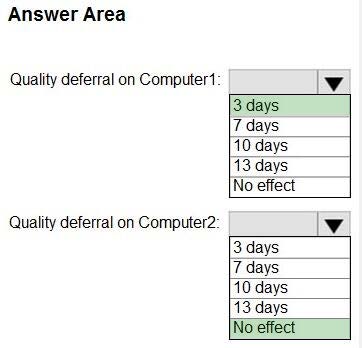
You have two computers that run Windows 10. The computers are enrolled in Microsoft Intune as shown in the following table.
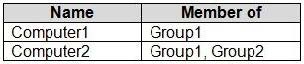

Windows 10 update rings are defined in Intune as shown in the following table.
You assign the update rings as shown in the following table.

What is the effect of the configurations on Computer1 and Computer2? To answer, select the appropriate options in the answer area.
Hot Area:
Correct Answer:
Question 5:
HOTSPOT
You have a Microsoft 365 E5 subscription that contains 100 Windows 10 devices enrolled in Microsoft Intune.
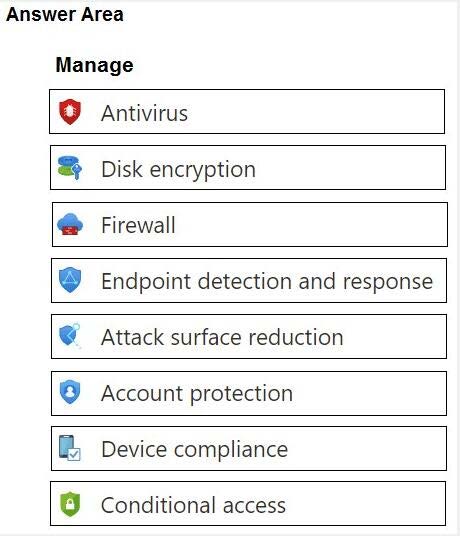
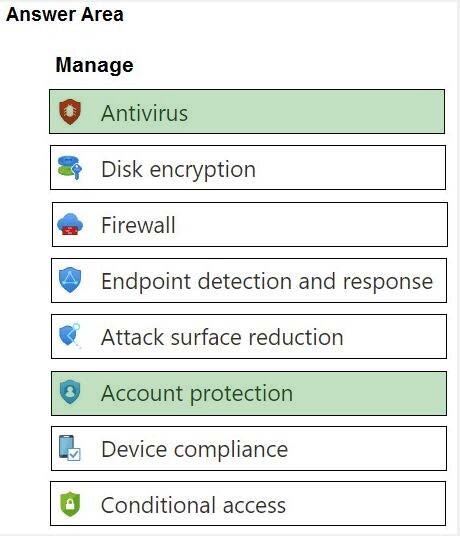
You need to create Endpoint security policies to meet the following requirements:
1.
Hide the Firewall and network protection area in the Windows Security app.
2.
Disable the provisioning of Windows Hello for Business on the devices.
Which two policy types should you use? To answer, select the policies in the answer area.
NOTE: Each correct selection is worth one point.
Hot Area:
Correct Answer:
Question 6:
HOTSPOT
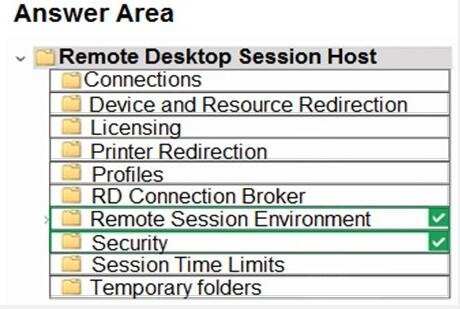
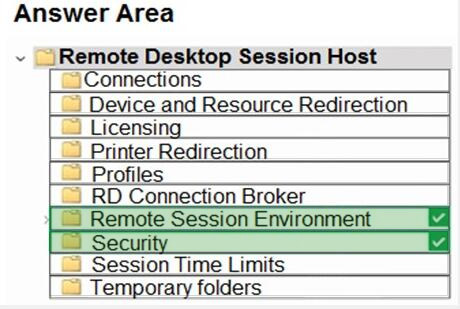
Your network contains an Active Directory domain. The domain contains 1,000 computers that run Windows 11.
You need to configure the Remote Desktop settings of all the computers. The solution must meet the following requirements:
Prevent the sharing of clipboard contents.
Ensure that users authenticate by using Network Level Authentication (NLA).
Which two nodes of the Group Policy Management Editor should you use? To answer, select the appropriate nodes in the answer area.
NOTE: Each correct selection is worth one point.
Hot Area:
Correct Answer:
Question 7:
HOTSPOT
Your network contains an Active Directory domain.
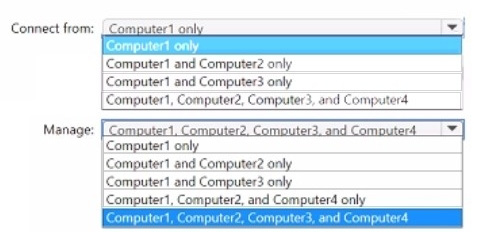
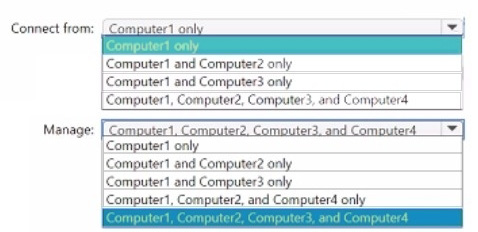
The domain contains four computer named Computer 1. Computet2. Computed, and Computer4 that run Windows 10. Vou perform the following actions:
On Computer1, you install Windows Admin Center and configure Windows Defender Firewall to allow incoming communication over TCP pons 80.443. and 6516.
On Computed, you run the Enable-PS Remoting cmdlet.
On Computer 3, you configure Windows Defender firewall to allow Windows Remote Management (WinRM) traffic
On Computer4, you run the winrm quickconfig command.
You need to manage the computers remotely by using Windows Admin Center.
From which computers can you connect to Windows Admin Center, and which computers can you manage by using Windows Admin Center? To answer, select the appropriate options in the answer area.
NOTE: Each correct selection is worth one point.
Hot Area:
Correct Answer:
Question 8:
HOTSPOT
You have an Azure AD tenant named contoso.com that contains the users shown in the following table.

For contoso.com, the Mobility (MDM and MAM) settings have the following configurations:
MDM user scope: Group1 MAM user scope: Group2 You purchase the devices shown in the following table:
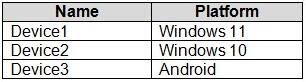
For each of the following statements, select Yes if the statement is true. Otherwise, select No.
Hot Area:
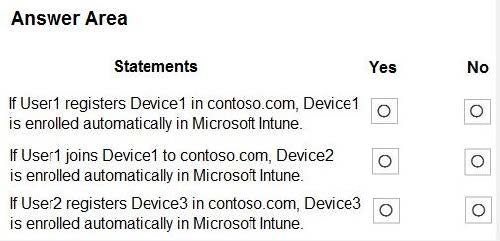
Correct Answer:
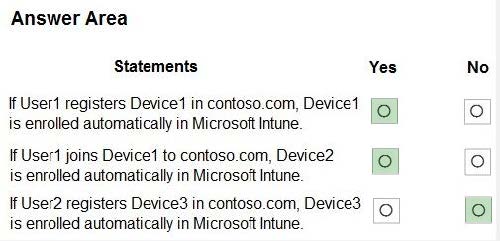
Question 9:
HOTSPOT
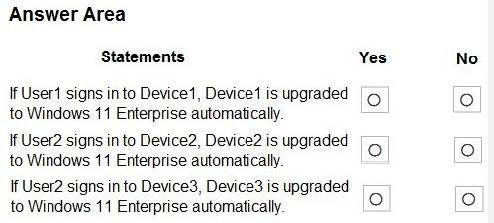
Your network contains an on-premises Active Directory Domain Services (AD DS) domain that syncs with an Azure AD tenant. The tenant contains the users shown in the following table.

You assign Windows 10/11 Enterprise E5 licenses to Group1 and User2. You deploy the devices shown in the following table.

For each of the following statements, select Yes if the statement is true. Otherwise, select No. NOTE: Each correct selection is worth one point.
Hot Area:
Correct Answer:
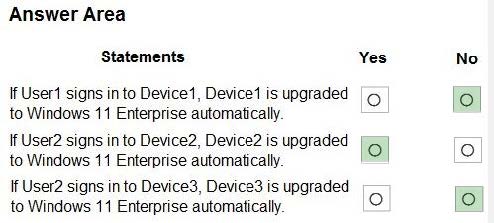
1.
NO (missing on-premises sync)
If you have an on-premises Active Directory Domain Services (AD DS) domain, you need to synchronize the identities in the on-premises AD DS domain with Azure AD. This synchronization is required for users to have a single identity that
they can use to access their on-premises apps and cloud services that use Azure AD. An example of a cloud service is Windows Enterprise E3 or E5.
https://learn.microsoft.com/en-us/windows/deployment/deploy-enterprise-licenses
2.
YES (hybrid domain joined supported)
Requirements on devices :Devices must also be joined to Azure AD, or hybrid domain joined with Azure AD Connect. Customers who are federated with Azure AD are also eligible.
https://learn.microsoft.com/en-us/windows/deployment/deploy-enterprise-licenses
3.
NO
Active subscription supports upgrade only from Pro to Enterprise.
Question 10:
HOTSPOT
You have an Azure AD tenant that contains the following:
1.
Windows 11 devices that are joined to Azure AD
2.
A user that has a display name of User1 and a UPN of [email protected]
You enable Remote Desktop on the Windows 11 devices.
You need to ensure that User1 can use Remote Desktop to connect to the devices.
How should you complete the command that must be run on each device? To answer, select the appropriate options in the answer area
NOTE: Each correct selection is worth one point.
Hot Area:
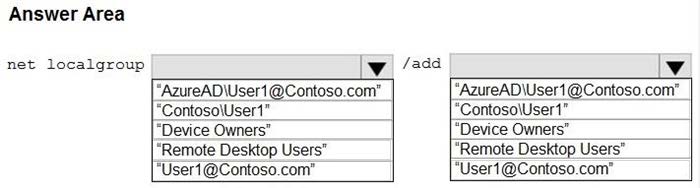
Correct Answer:
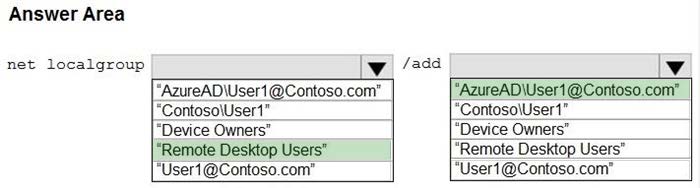
Box 1: “Remote Desktop Users”
Connect to remote Azure Active Directory joined device Add users to Remote Desktop Users group Remote Desktop Users group is used to grant users and groups permissions to remotely connect to the device. Users can be added either manually or through MDM policies:
Adding users manually:
You can specify individual Azure AD accounts for remote connections by running the following command, where is the UPN of the user, for example [email protected]:
net localgroup “Remote Desktop Users” /add “AzureAD\”
Box 2: AzureAD\[email protected]
Reference:
https://learn.microsoft.com/en-us/windows/client-management/client-tools/connect-to-remote-aadj-pc
Question 11:
HOTSPOT
You have a Microsoft 365 E5 subscription that uses Microsoft Intune.
Devices are enrolled in Intune as shown in the following table.

The devices are the members of groups as shown in the following table.

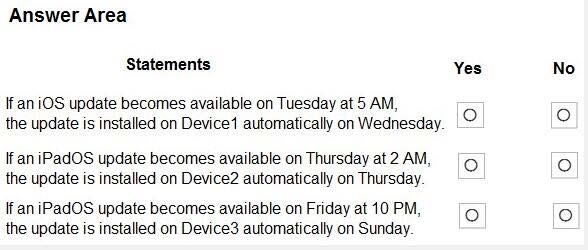
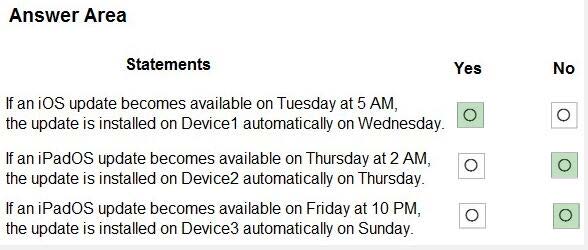
You create an iOS/iPadOS update profile as shown in the following exhibit.
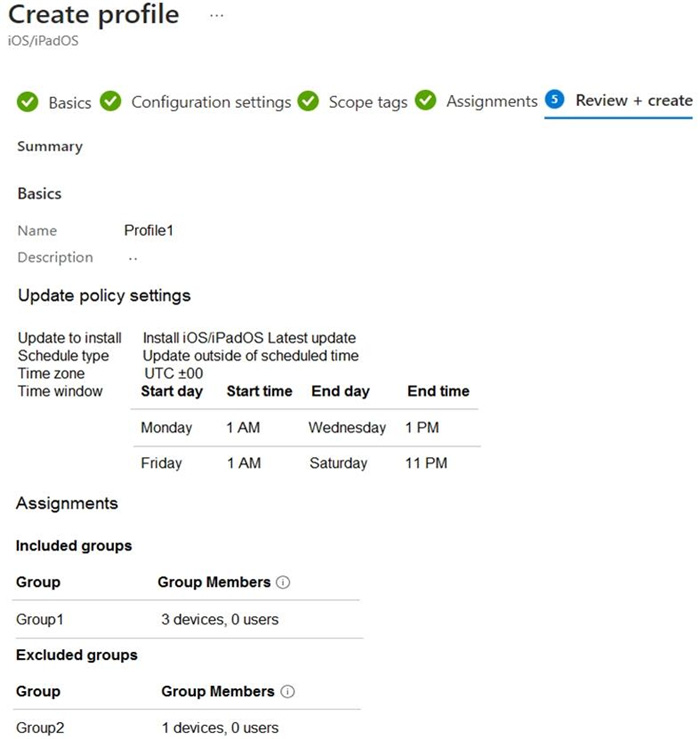
For each of the following statements, select Yes if the statement is true. Otherwise, select No. NOTE: Each correct selection is worth one point.
Hot Area:
Correct Answer:
Question 12:
You have a Microsoft 365 subscription that contains 1,000 Android devices enrolled in Microsoft Intune. You create an app configuration policy that contains the following settings:
Device enrollment type: Managed devices Profile Type: All Profile Types Platform: Android Enterprise
Which two types of apps can be associated with the policy? Each correct answer presents a complete solution. NOTE: Each correct selection is worth one point.
A. Built-in Android app
B. Managed Google Play store app
C. Web link
D. Android Enterprise system app
E. Android store app
Correct Answer: BD
Question 13:
You have a Microsoft 365 E5 subscription and 25 Apple iPads.
You need to enroll the iPads in Microsoft Intune by using the Apple Configurator enrollment method.
What should you do first?
A. Configure an Apply MDM push certificate.
B. Add your user account as a device enrollment manager (DEM).
C. Modify the enrollment restrictions.
D. Upload a file that has the device identifiers for each iPad.
Correct Answer: A
Set up iOS/iPadOS device enrollment with Apple Configurator
Prerequisites
Physical access to iOS/iPadOS devices
Set MDM authority
An Apple MDM push certificate
Device serial numbers (Setup Assistant enrollment only)
USB connection cables
macOS computer running Apple Configurator 2.0
Note:
Upload and renew your Apple MDM push certificates in Microsoft Intune. An Apple MDM Push certificate is required to manage iOS/iPadOS and macOS devices in Microsoft Intune, and enables devices to enroll via:
The Intune Company Portal app.
Apple bulk enrollment methods, such as the Device Enrollment Program, Apple School Manager, and Apple Configurator.
Certificates must be renewed annually.
Reference:
https://learn.microsoft.com/en-us/mem/intune/enrollment/apple-mdm-push-certificate-get
Question 14:
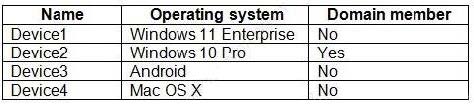
You have the devices shown in the following table.
You plan to implement Microsoft Defender for Endpoint.
You need to identify which devices can be onboarded to Microsoft Defender for Endpoint.
What should you identify?
A. Device1 only
B. Device2 only
C. Device1, Device2 only
D. Device1, Device2, and Device3 only
E. Device1, Device2, Device3, and Device4
Correct Answer: D
The Windows versions and Android are supported.
Note: You can onboard the following Windows operating systems:
Windows 8.1 Windows 10, version 1607 or later Windows 11 Windows Server 2012 R2 Windows Server 2016 Windows Server Semi-Annual Channel (SAC), version 1803 or later Windows Server 2019 Windows Server 2022
Note 2: By default, Microsoft Defender for Endpoint for Android includes and enables the web protection feature. Web protection helps to secure devices against web threats and protect users from phishing attacks. While this protection is enabled by default, there are valid reasons to disable it on some Android devices.
Incorrect:
* Not Device4
Network protection for macOS is now available for all Mac devices onboarded to Defender for Endpoint.
Reference:
https://learn.microsoft.com/en-us/mem/intune/protect/advanced-threat-protection-manage-android
https://learn.microsoft.com/en-us/microsoft-365/security/defender-endpoint/mac-whatsnew
Question 15:
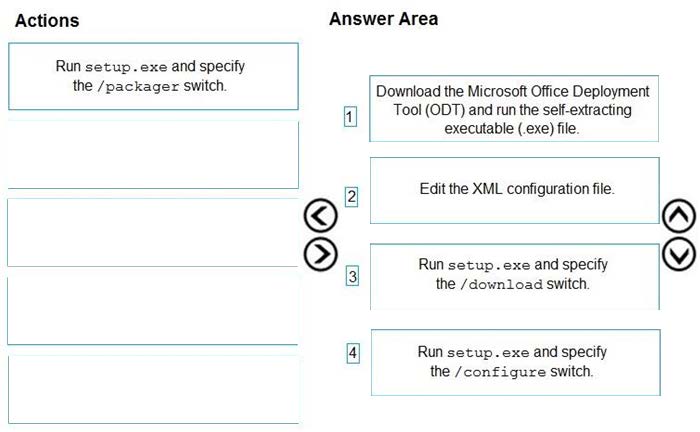
DRAG DROP
You have a Microsoft 365 E5 subscription and a computer that runs Windows 11.
You need to create a customized installation of Microsoft 365 Apps for enterprise.
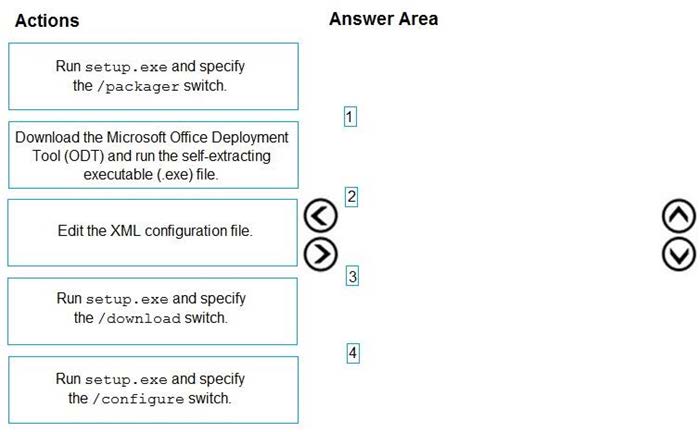
Which four actions should you perform in sequence? To answer, move the appropriate cmdlets from the list of cmdlets to the answer area and arrange them in the correct order.
Select and Place:
Correct Answer:
1.
Download ODT application
2.
Create a configuration file (XML)
3.
setup.exe /download to download the installation files
4.
setup.exe /configure to deploy the application
https://learn.microsoft.com/en-us/deployoffice/deploy-microsoft-365-apps-local-source
1.
Download ODT application
2.
Create a configuration file (XML)
3.
setup.exe /download to download the installation files
4.
setup.exe /configure to deploy the application https://learn.microsoft.com/en-us/deployoffice/deploy-microsoft-365-apps-local-source https://learn.microsoft.com/en-us/deployoffice/overview-office-deployment-tool#download-the-installation-files-for-microsoft-365-apps upvoted 29 times
…
Final
These 15 practice questions give you a glimpse into the structure and challenges of the MD-102 exam. They’re just a small part of our 351-question exam prep material at https://www.leads4pass.com/md-102.html, covering all exam objectives!
Preparing for the MD-102 exam requires strategy and focus. Try these practice questions, identify your knowledge gaps, and tackle the exam with confidence! Have prep tips or questions? Share them in the comments.
Act Now: Subscribe to our blog for the latest MD-102 prep insights!